I must admit I am not a fan of the EntityDelete() function. Its inability to handle multiple records always nagged me. I know I can allways go back to CFQUERY or use ormexecutequery(). But what nagged me the most appeared to be the need to do an EntityLoad before I could remove the entity/record. This could potentially introduce unneeded database reads and latency.
e.g.:
myBook = EntityLoad("Book", 100, true);
EntityDelete(myBook);
Well it turnes out that the use of EntityLoad is not required. A colleague suggested I try the following instead which would eliminate the load operation, and since I thought that was pretty neat I am sharing ;o)
mybook = new Book();
mybook.setBOOKID(100);
EntityDelete(mybook);
In this fashion, you are creating the object reference in memory and guaranteeing that there is only one DB interaction at DELETE.
Cheers,
Bilal
Thursday, September 30, 2010


Sunday, July 25, 2010
VS2010: Visual Studio 2010 - finding web reference option when working with Windows Forms Applications
Something I ran into today made me do a double take. This could have originated from the initial configuration choice I made when setting up Visual Studio 2010 or the tool is trying to be so smart it starts to get confusing..
However it happened, it does seem to make things more difficult when trying to create windows form applications. In particular, if you want to use a web-reference in your regular windows application the number of clicks has increased and discoverability has decreased.
Adding web-references to consume web services in ASP.NET application is not impacted by this change. In particular the context sensitive links to add web-reference are gone when I am in the Solution Explorer working on a Windows Form Application.


However it happened, it does seem to make things more difficult when trying to create windows form applications. In particular, if you want to use a web-reference in your regular windows application the number of clicks has increased and discoverability has decreased.
Adding web-references to consume web services in ASP.NET application is not impacted by this change. In particular the context sensitive links to add web-reference are gone when I am in the Solution Explorer working on a Windows Form Application.

Instead the only thing you can seemingly do is to add a service reference. Though you can start here, web services that are registered through this channel do not behave at all like the previous releases of Visual Studio. Thus, beware, this is not what you want to do if you want to consume a regular web service, especially ones that are not created with VS to begin with. To get to the plain Jane adding of a web service you have to walk through some additional steps.
A) Select the "Add Service Reference..." option, then, click on the "Advanced..." button.

B) Click on the "Add Web Service" button from the advanced screen:

Allright that should do it to bring you back into the old web service ways.
Cheers,
B
Saturday, July 17, 2010
CF: The varExists() function -- Expanding IsDefined() to work with regular array and associative array notations.
Many times while working in ColdFusion code I am encountering the simple need to check for the existence of an index in an array, e.g. myArray[3]. While other languages may have had easier checks on this, in Adobe ColdFusion, I unfortunately, have to work around this scenario with many lines of code or different functions to call. Thus, I am able to construct fully well formed variable references and use them, but cannot check their validity in a simple fashion.
For example, I can't do a simple call to a universal function such as IsDefined("myVar[3]"). In this simple scenario we could have used ArrayIsDefined(), however, the scenarios I normally deal with are not so simple. In my scenarios I am not sure about whether "myVar" is an array in the first place or whether the index is numeric. E.g. I may need to check myVar[checkIndex]; this maybe a strucure with an associative array notation which takes me back to square one. Along these lines, multi-dimensional arrays such as myArray[3][4] are equally unqualified for ArrayIsDefined().
Similarly associative array notations that can be used with structures, e.g. myStruct["testNode"], equally do poorly on these checks and could require some sort of special checking and more lines of code.
How about a combination of things:
TestStruct.Animals['species'][1]['counts'][2]
All of these scenarios go beyond the ability of IsDefined() or other functions and cause more code to be written. Maybe this would be an opportunity to expand in future version of ColdFusion but for now we're stuck or are we? (yeah, rhetorical question this one).
I made this a test project and developed an alternative function, varExists(), to IsDefined(); it may not be usable in all scenarios but will come in handy in coding.
The sample implementation can be downloaded here (varExists.zip (3KB)).
The first objective was just to be able to handle the complex notation scenarios that commonly fail under IsDefined().
e.g.:
varExists("TestStruct.Animals['species'][1]['counts'][2]") should operate without a hitch on complex variable notations. While at the same time maintaining full backward compatibility with IsDefined(). So you should be able to do things like this varExists(varName), varExists should check for the existince of the content referenced by the content of varName, e.g. a string such as "TestStruct.myArray[2][1]".
But, why stop there, the next thing that I commonly do once I check for the existence of a variable is to retrieve its value for some sort of operation, so I added this option as second argument. Thus, varExists will automatically return the value referenced as part of its operation if "True" is passed as second argument, e.g. varExists("myUserArray[33]",true). This would return the UserName at array index position 33.
Another common task I perform when the value is not known or "undefined" is to assume a default value. Thus, I added this as third parameter. When a third parameter is supplied it will be returned, when the actual variable reference is undefined.
For example:
varExists("myUserArray[33]",true,"John Doe")
would return "John Doe" if the array index 33 is not populated for some reason.
For example, I can't do a simple call to a universal function such as IsDefined("myVar[3]"). In this simple scenario we could have used ArrayIsDefined(), however, the scenarios I normally deal with are not so simple. In my scenarios I am not sure about whether "myVar" is an array in the first place or whether the index is numeric. E.g. I may need to check myVar[checkIndex]; this maybe a strucure with an associative array notation which takes me back to square one. Along these lines, multi-dimensional arrays such as myArray[3][4] are equally unqualified for ArrayIsDefined().
Similarly associative array notations that can be used with structures, e.g. myStruct["testNode"], equally do poorly on these checks and could require some sort of special checking and more lines of code.
How about a combination of things:
TestStruct.Animals['species'][1]['counts'][2]
All of these scenarios go beyond the ability of IsDefined() or other functions and cause more code to be written. Maybe this would be an opportunity to expand in future version of ColdFusion but for now we're stuck or are we? (yeah, rhetorical question this one).
I made this a test project and developed an alternative function, varExists(), to IsDefined(); it may not be usable in all scenarios but will come in handy in coding.
The sample implementation can be downloaded here (varExists.zip (3KB)).
The first objective was just to be able to handle the complex notation scenarios that commonly fail under IsDefined().
e.g.:
varExists("TestStruct.Animals['species'][1]['counts'][2]") should operate without a hitch on complex variable notations. While at the same time maintaining full backward compatibility with IsDefined(). So you should be able to do things like this varExists(varName), varExists should check for the existince of the content referenced by the content of varName, e.g. a string such as "TestStruct.myArray[2][1]".
But, why stop there, the next thing that I commonly do once I check for the existence of a variable is to retrieve its value for some sort of operation, so I added this option as second argument. Thus, varExists will automatically return the value referenced as part of its operation if "True" is passed as second argument, e.g. varExists("myUserArray[33]",true). This would return the UserName at array index position 33.
Another common task I perform when the value is not known or "undefined" is to assume a default value. Thus, I added this as third parameter. When a third parameter is supplied it will be returned, when the actual variable reference is undefined.
For example:
varExists("myUserArray[33]",true,"John Doe")
would return "John Doe" if the array index 33 is not populated for some reason.
The example code has the test array and unit tests with sample scenarios. The hope is that eventually the ColdFusion language can accommodate these type of operations natively.
Happy experimenting.
Cheers,
B.
Addition:
The Railo CFML engine does not exhibit the flaw outlined in this article. Thus, if you use Railo, you probably will not encounter scenarios in which you can construct a valid variable reference but cannot check for its existence. The IsDefined() function works as expected, however, if you want the expanded functionality of retrieving variable values etc. you would still need to use the varExists() User Defined Function (UDF) provided here.
Best,
B.
Tuesday, June 1, 2010
CF: Connecting 64-bit Coldfusion to 32-bit MS Access databases
First off, don't ask me why you would want to do this, just go with the flow.
In other words, let's not get bogged down on how you should not put anything on Microsoft Access anyway and accept the fact that there is still many applications that are perfectly happy with it ;o)
The problem has existed for a while but it dawned on me more clearly as I was sitting in on a hands-on beginner CF class at NC Dev Con and several of the participants immediately ran into this with their brand spanking new, high powered, Windows 7 64-bit computers.
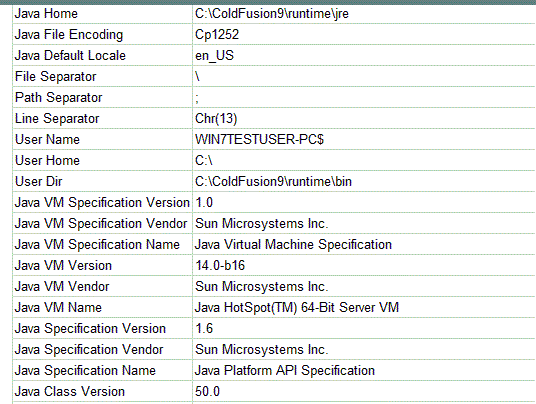
So it seems more common that you would want to take the 64-bit edition from Adobe for a spin. But as soon as you attempt to connect to anything 32 bit you receive non-descriptive errors such as:
"Unable to update the NT registry. Variable DRIVERPATH is undefined."
Maybe dropping those options from the list of available drivers would have been wiser and less frustrating for users. Something for Adobe to ponder about I guess.
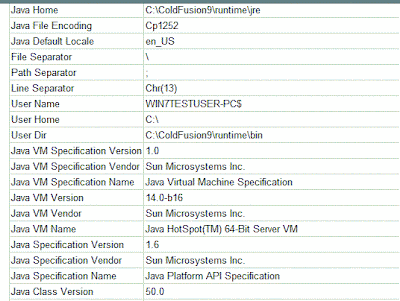
Microsoft does not have any (as of this writing at least) ODBC drivers for 64-bit Microsoft Access; in general, not much ODBC activity in a long time from the Microsoft camp. So, you might be well able to load up Office 2010 in 64 bit format; using the resulting databases for your projects, however, is a fairly complicated tasks.
As with all workarounds there are many steps to complete, so here we go:
1.) Download and Install 64 bit SQL Server 2005 Express Edition. You cannot use SQL Server 2008 Express edition, so don't try. It is lacking the needed OLE DB Provider.
2.) Download and Install Management Tools
3.) Download and Install Microsoft SQL Server JDBC drivers
For steps 1 through 3 here is a nice tutorial by Steve Brownlee - Fusioncube
4. ) Copy your MDB somewhere, e.g. c:\temp
5.) Created Linked Databases using Microsoft Jet 4.0 OLE DB Provider
a) Linked Server Menu. Right click on the Linked server node and then click on "New Linked Server..." sub-menu option:
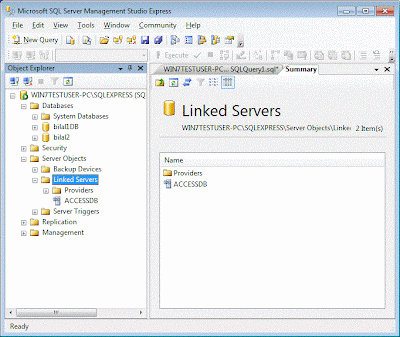
b)linked server dialog. Product name can be anything you like. Data source should point to your access file:
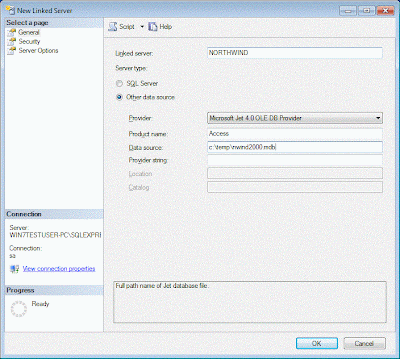
6.) Create DS in CF Admin
a) create type other
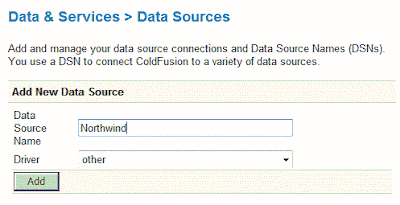
b) specify data source connection properties
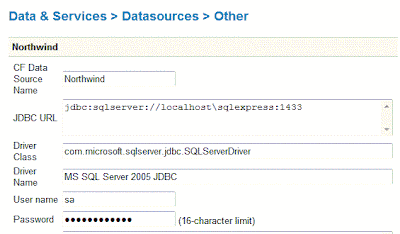
7.) Create sample code for CF. Your query code has to be changed, so you might want to create a variable to hold your prefix to your tables in case you change from 64 bit to 32 bit and vice versa.
Note that you have to use the four part syntax to query out of a linked MS Access to SQL database. You are just omitting two parts, there is also another syntax possible : Openquery(Linked_Server, 'Query') which I will not dig into.
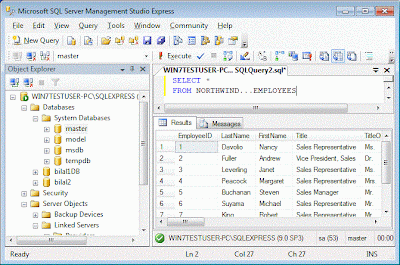
To specify a query table in your access database you start with the name you have entered in SQL Server while the creating the link. In my case this is "Northwind". This name is followed by three periods (...) and, then, by the actual table name:
e.g. : NORTHWIND...EMPLOYEES
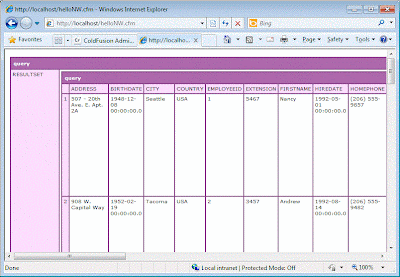
Here is my example code:
HelloNW.cfm file:
8.) Enjoy
Cheers,
B.
In other words, let's not get bogged down on how you should not put anything on Microsoft Access anyway and accept the fact that there is still many applications that are perfectly happy with it ;o)
The problem has existed for a while but it dawned on me more clearly as I was sitting in on a hands-on beginner CF class at NC Dev Con and several of the participants immediately ran into this with their brand spanking new, high powered, Windows 7 64-bit computers.
So it seems more common that you would want to take the 64-bit edition from Adobe for a spin. But as soon as you attempt to connect to anything 32 bit you receive non-descriptive errors such as:
"Unable to update the NT registry. Variable DRIVERPATH is undefined."
Maybe dropping those options from the list of available drivers would have been wiser and less frustrating for users. Something for Adobe to ponder about I guess.
Microsoft does not have any (as of this writing at least) ODBC drivers for 64-bit Microsoft Access; in general, not much ODBC activity in a long time from the Microsoft camp. So, you might be well able to load up Office 2010 in 64 bit format; using the resulting databases for your projects, however, is a fairly complicated tasks.
As with all workarounds there are many steps to complete, so here we go:
1.) Download and Install 64 bit SQL Server 2005 Express Edition. You cannot use SQL Server 2008 Express edition, so don't try. It is lacking the needed OLE DB Provider.
2.) Download and Install Management Tools
3.) Download and Install Microsoft SQL Server JDBC drivers
For steps 1 through 3 here is a nice tutorial by Steve Brownlee - Fusioncube
4. ) Copy your MDB somewhere, e.g. c:\temp
5.) Created Linked Databases using Microsoft Jet 4.0 OLE DB Provider
a) Linked Server Menu. Right click on the Linked server node and then click on "New Linked Server..." sub-menu option:

b)linked server dialog. Product name can be anything you like. Data source should point to your access file:

6.) Create DS in CF Admin
a) create type other

b) specify data source connection properties

7.) Create sample code for CF. Your query code has to be changed, so you might want to create a variable to hold your prefix to your tables in case you change from 64 bit to 32 bit and vice versa.
Note that you have to use the four part syntax to query out of a linked MS Access to SQL database. You are just omitting two parts, there is also another syntax possible : Openquery(Linked_Server, 'Query') which I will not dig into.

To specify a query table in your access database you start with the name you have entered in SQL Server while the creating the link. In my case this is "Northwind". This name is followed by three periods (...) and, then, by the actual table name:
e.g. : NORTHWIND...EMPLOYEES
Here is my example code:
HelloNW.cfm file:
<cfquery name="selNorthwindEE" datasource="Northwind">

SELECT *
FROM NORTHWIND...EMPLOYEES

</cfquery>

<cfdump var="#selNorthwindEE#">
8.) Enjoy

Cheers,
B.
Monday, May 17, 2010
CF:Flex: FOF: Flex on Fusion, thoughts on what it takes to create a unified framework
The Situation
If you have worked on either Flex or ColdFusion you know that nowadays there is more development frameworks than people know what to do with.
At one point having a consistent pre-defined path to application development on either of these platforms meant you had to invent wheels many times over. Now, the situation has changed to one where you attempting to decide which framework to use; long discussions and passions are aroused.
At some level this has become as counter-productive as the use of no framework was before.
Here are the commonalities I noticed:
a) Frameworks are for developers:
You have to learn the platform, learn the framework and have some sort of knack for writing code.
b) Frameworks only cover one or the other technology.
They do not span technologies, even if your application is expected to. Thus if you have to write an app that uses a ColdFusion back-end and a Flex front-end; you have to put the puzzle together yourself. One may even say we are back where we were several years in the no framework days.
I understand, there are wizards to get you started in both directions, e.g. CF wizards for flex, and flex wizards for CF, but a wizard a framework does not make ;o)
Don't get me wrong. There are some cool things being done with scaffolding to generate fully fleshed out UIs that are generated from a database, a la Ruby. For example, check out Apptacular.
c) Frameworks focus on developer application parts
Frameworks focus on allowing programmers a base structure that can expanded. Most of this centers around the use of the MVC pattern in one form or the other. However, less attention is given on other services needed in order make an application complete or usable.
For example commonly left to the programmers are things like internationalization, user management, rights management, currency and data management, skinning management.
The Thought
Using frameworks either on ColdFusion or Flex is nothing new. Creating a Framework that spans both is. Thus the idea of Flex on Fusion (FoF) came into my head and just would not let go. I thought, well, now what? Do you really want to create yet another framework even if the idea sounds cool. Who would want to learn it? and Why?
But, for some reason, the idea was persistent and would not easily go away by itself.
More thinking occurred and I do think that this framework has to enable the user (not necessarily a developer) to quickly built full applications. More like the Magic environment, more graphical, less focus on writing code.
And so I am putting it out here to gather feedback and expand on it.
The idea is not to obsolete all other frameworks, rather build a more user centric framework that can be used along with other frameworks. Thus, you should be able to use platform level frameworks to construct sub-pieces. Use the stength of each plattform, CF, for the database and logic, Flex, for advanced visualation and UI, in a combined stronger form.
I am envisioning a startup process that walks the user through the basic steps, e.g. pointing at the database and determining a subdirectory to write the model implementation, etc. This is similar to other scaffolding models; however, the application that is built will also have a user and security model. More importantly, after the basic build is finished, there should be a UI that can be used to define the application further without coding. Adding more data/screens should all be doable via UI. In the extreme thought the UI would expose an IDE for the pieces that require coding.
Once an application is generated, it can extended easily be extended while it is running by users with sufficient permissions.
I will post some more detail describing screens and workflow in a bit.
Cheers,
B.
If you have worked on either Flex or ColdFusion you know that nowadays there is more development frameworks than people know what to do with.
At one point having a consistent pre-defined path to application development on either of these platforms meant you had to invent wheels many times over. Now, the situation has changed to one where you attempting to decide which framework to use; long discussions and passions are aroused.
At some level this has become as counter-productive as the use of no framework was before.
Here are the commonalities I noticed:
a) Frameworks are for developers:
You have to learn the platform, learn the framework and have some sort of knack for writing code.
b) Frameworks only cover one or the other technology.
They do not span technologies, even if your application is expected to. Thus if you have to write an app that uses a ColdFusion back-end and a Flex front-end; you have to put the puzzle together yourself. One may even say we are back where we were several years in the no framework days.
I understand, there are wizards to get you started in both directions, e.g. CF wizards for flex, and flex wizards for CF, but a wizard a framework does not make ;o)
Don't get me wrong. There are some cool things being done with scaffolding to generate fully fleshed out UIs that are generated from a database, a la Ruby. For example, check out Apptacular.
c) Frameworks focus on developer application parts
Frameworks focus on allowing programmers a base structure that can expanded. Most of this centers around the use of the MVC pattern in one form or the other. However, less attention is given on other services needed in order make an application complete or usable.
For example commonly left to the programmers are things like internationalization, user management, rights management, currency and data management, skinning management.
The Thought
Using frameworks either on ColdFusion or Flex is nothing new. Creating a Framework that spans both is. Thus the idea of Flex on Fusion (FoF) came into my head and just would not let go. I thought, well, now what? Do you really want to create yet another framework even if the idea sounds cool. Who would want to learn it? and Why?
But, for some reason, the idea was persistent and would not easily go away by itself.
More thinking occurred and I do think that this framework has to enable the user (not necessarily a developer) to quickly built full applications. More like the Magic environment, more graphical, less focus on writing code.
And so I am putting it out here to gather feedback and expand on it.
The idea is not to obsolete all other frameworks, rather build a more user centric framework that can be used along with other frameworks. Thus, you should be able to use platform level frameworks to construct sub-pieces. Use the stength of each plattform, CF, for the database and logic, Flex, for advanced visualation and UI, in a combined stronger form.
I am envisioning a startup process that walks the user through the basic steps, e.g. pointing at the database and determining a subdirectory to write the model implementation, etc. This is similar to other scaffolding models; however, the application that is built will also have a user and security model. More importantly, after the basic build is finished, there should be a UI that can be used to define the application further without coding. Adding more data/screens should all be doable via UI. In the extreme thought the UI would expose an IDE for the pieces that require coding.
Once an application is generated, it can extended easily be extended while it is running by users with sufficient permissions.
I will post some more detail describing screens and workflow in a bit.
Cheers,
B.
Thursday, April 15, 2010
Java: VisualVM "Add JMX Connection..." missing from file menu
A quick note as I had not seen this before.
This occurred to me on windows 2008 R2 server platform.
I looked and even compared log files among computers could not find anything conclusive that would cause this. But for some reason the option to add a JMX Connection was not available any longer in VisualVM tool.
Not in context menu and not in File menu.
Much trial and error followed but the solution was to redo the installation.
Thus, the only thing that worked is to delete the VisualVM directory, re extract the zip files to a different directory, then start the VisualVM exe with Administrative privileges.
After the initial calibration, the Menu item for JMX Connection was available again.
Yohoo!
-B
This occurred to me on windows 2008 R2 server platform.
I looked and even compared log files among computers could not find anything conclusive that would cause this. But for some reason the option to add a JMX Connection was not available any longer in VisualVM tool.
Not in context menu and not in File menu.
Much trial and error followed but the solution was to redo the installation.
Thus, the only thing that worked is to delete the VisualVM directory, re extract the zip files to a different directory, then start the VisualVM exe with Administrative privileges.
After the initial calibration, the Menu item for JMX Connection was available again.
Yohoo!
-B
CF: Java: Using free VisualVM tool to monitor running ColdFusion Servers
You may have had a chance to use the VisualVM tools in the past and found them helpful to get an idea on what is actually happening on the VM while your code is running.

The VisualVM tools can help you detect memory leaks in progress as well as other constraints on your server before it crashes. But even after a crash these tools are helpful. The tools are very graphical and easier to use than attempting to read thread dumps and heap dumps manually.
Here are some simple steps to use this great tool set with ColdFusion.
1) download java jdk 1.6.09 or later
http://java.sun.com/javase/downloads/index.jsp
2) Download Visual VM
https://visualvm.dev.java.net/
3) Configure Coldfusion jmx access
Best way is to go to Coldfusion Administrator Java and JVM settings section.
Add the following parameters:
-Dcom.sun.management.jmxremote.port=8701
-Dcom.sun.management.jmxremote.ssl=false
-Dcom.sun.management.jmxremote.authenticate=false

You can decide whether to use ssl or not, and also on the port to use. If you want to use jmx authentication I would recommend you read:
http://java.sun.com/javase/6/docs/technotes/guides/management/agent.html#gdenl
4) Configure your Visual vm start up to point to your jdk if you have not set environmental variables:
e.g. on Windows
if you extracted the visualvm files into C:\Java\visualvm_122
and
Your JDK is located in C:\Java\jdk1.6.0_19
then you can use the following command line:
C:\Java\visualvm_122\bin\visualvm.exe --jdkhome "C:\Java\jdk1.6.0_19"
I put it in a batch file that I can start easily.
5) Start up the VisualVM tool (it may have to go through calibration first, simply acknowledge), then, and establish a connection a JMX connection by right clicking on the local node and choosing "Add JMX Connection..."

The VisualVM tools can help you detect memory leaks in progress as well as other constraints on your server before it crashes. But even after a crash these tools are helpful. The tools are very graphical and easier to use than attempting to read thread dumps and heap dumps manually.
Here are some simple steps to use this great tool set with ColdFusion.
1) download java jdk 1.6.09 or later
http://java.sun.com/javase/downloads/index.jsp
2) Download Visual VM
https://visualvm.dev.java.net/
3) Configure Coldfusion jmx access
Best way is to go to Coldfusion Administrator Java and JVM settings section.
Add the following parameters:
-Dcom.sun.management.jmxremote.port=8701
-Dcom.sun.management.jmxremote.ssl=false
-Dcom.sun.management.jmxremote.authenticate=false
You can decide whether to use ssl or not, and also on the port to use. If you want to use jmx authentication I would recommend you read:
http://java.sun.com/javase/6/docs/technotes/guides/management/agent.html#gdenl
4) Configure your Visual vm start up to point to your jdk if you have not set environmental variables:
e.g. on Windows
if you extracted the visualvm files into C:\Java\visualvm_122
and
Your JDK is located in C:\Java\jdk1.6.0_19
then you can use the following command line:
C:\Java\visualvm_122\bin\visualvm.exe --jdkhome "C:\Java\jdk1.6.0_19"
I put it in a batch file that I can start easily.
5) Start up the VisualVM tool (it may have to go through calibration first, simply acknowledge), then, and establish a connection a JMX connection by right clicking on the local node and choosing "Add JMX Connection..."

6) Add connection parameters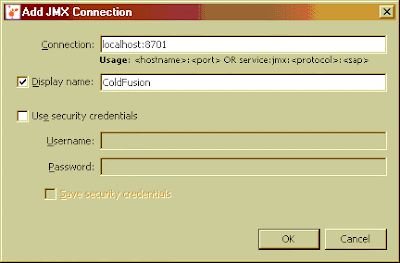
Now you should be able monitor your server as it runs. I found this to be more stable than the Server Monitor in Enterprise versions of ColdFusion especially under load. It does not have all the same information but you can get a detailed breakdown of VM memory use.
To get into the details of which CF code is using memory you have to generate a heap dump and use the heap walker to run the analysis. All the classes starting with cf... are your code running on the VM.
You also have the option to monitor remote ColdFusion servers as well. You monitor multiple remote and local CF instances in one console, however, unlike the local monitoring, you cannot generate a heap dump when using remote connections.
Creating a remote connection involves two steps in VisualVM after you enabled jmx access on ColdFusion.
a) Adding a remote host. You do that by right clicking on the "Remote" node in VisualVM

b) Specify the host name and display name and connection jstatd port (this is the same port you set in your CF JVM start up parameters). You will need to use the Advanced Settings dialog to do this. The port should be the same you set in the ColdFusion Java and JVM settings for that instance of CF.
c) Set up a remote JMX connection by right clicking on the server name node and choosing "Add JMX Connection...". This will bring up a similar window as in step 6 above. Fill in the server and port information and you should be able to see your server.
Another common use for the VisualVM tool is analyse a Heap Dump after a VM crashes due to memory problems. You can open and walk through the final VM Heap state. To make ColdFusion produce a heap dump you will have to change the jrun.config file and add this config option:
-XX:+HeapDumpOnOutOfMemoryError
If there is a crash the heap dump should be a text file located in your {coldfusion}\bin folder.
More information on how to use the VisualVM tool is available on the VisualVM website; definitely worth a look.
Cheers,
-B.
Subscribe to:
Posts (Atom)