Friday, October 16, 2020

LG V35 Home Screen Crashing with "Home is not responding." message

I like my LG V 35 Android phone. It is fast, has a kick-ass sound chip and worked perfectly for the


longest time. But, all of a sudden it would not open the Home screen (pressing on circle from bottom phone menu) anymore.

This should take half a second at most, it started taking 30s plus, with screen turning black. The Home screen would, then, completely reload.

The message "Home screen is not responding. Do you want to continue to wait or quit?" would sometimes appear.

I rebooted and it would work for a bit. Started to delete downloaded apps. Looking at Internet boards to see if this problem has been encountered by others. It did not seem like others were seeing this.

I was getting desperate since the only other solution suggested was to reset phone back to factory settings.

Last try using safe-mode to double check things. Unfortunately, the behavior did not go away in safe-mode. This made me look into the core applications that are shipped with the phone, since in safe-mode, nothing else is running.

More twiddling and experimenting followed.

The solutions was simple but indicated a bug in the Google Mail application when working with Office 365 email accounts. I removed a Microsoft Office 365 account I had recently added. When Google Mail was connected to this account it would hang up the phone's home screen. Making the phone nearly unusable since you cannot effective navigate between apps.

Odd.

I downloaded the Office Outlook for Mobile app for my office 365 account and my phone works again. I can check the email without hanging up my phone.

If you are finding yourself in a similar situation I hope this helps.

Cheers,

Bilal


Tuesday, June 16, 2020

ReactNative: Quickly integrate contactless payments into your react-native projects

Quickly integrate contactless payments into your react-native projects

Trying to go out an build a contactless payment solution from scratch is not something that everyone has the time and gumption to do. As far as approach there are principally two successful approaches to contactless one can follow. The RFC and the QR methodology.
The RFC Methodology
This ist the incumbent process in most of Europe and North America. Buyers use an RFC chip based Credit or Debit card or mobile device. Buyers swipe the device over a specialized card reader and seller, then, connects to card or payment processor.
Popular implementations of this in the US for mobile devices are represented by Apple Pay and Google Pay. The issue for us what that this method had a few drawbacks:
  • We needed to have special hardware. Some of which has be rented on a monthly basis by the seller (merchant).
  • It really wasn't completely touch free. Debit cards still required touching the seller terminals. Other terminals required confirmations on occasion.
  • Getting up and running in a real world store was not a matter of hours, but weeks and months.
The advantages were that users mostly are familiar with the payment processes in the US.
The QR Methodology
This is the Asian model and very popular in China. Both AliPay and WeChat pay and some others use this as their standard of starting the payment processing cycle.
The drawbacks here are users in US and Europe are less familiar with this methodology then they are with others though this is quickly changing. We see more users becoming familiar with QRs for other purposes besides advertising. Users now see them in restaurants for menu lookup and on rentals when renting scooters or bikes.
Thus the drawbacks:
a) User familiarity with process
b) Since processing occurs on different device than payment initiation closing the payment loop requires effort on programmers.
The advantages are that this, when done right, is:
a) Very quick to implement since no other hardware is needed
b) Very inexpensive for seller (merchants)
c) Can be truly contactless even with debit cards
d) Can close the payment loop even when process is distributed across devices.
Thus, in this tutorial we will focus on QR based contactless payments and show you how to quickly get started using them in your react-native based mobile applications.
We use the XcooBee contactless payments since it needs very little effort while providing many options as well as the ability to close the payment notification loop. capabilities and programming in the app.

Getting Started from Scratch

Prerequisites:

Setting up Payment Processing Backend

In our example, you will need a XcooBee Professional account and a Stripe account. Both of these are free to setup. Use the video tutorials or web tutorial to configure your first XcooBee Payment Project. This sets up you base infrastructure to process payments for your app. This is what you will need to do all the back-end processing.

The App

You can use create react native (CRA) or Expo project as baseline for our example. We will use Expo based version.
If you have never installed expo first install the command line tools:
npm install expo-cli --global

Create Your Expo Project

Creating your expo project is also straight forward.
expo init myPayProject => select blank (with Typescript)
cd myPayProject expo start
The last command should start a expo session with your expo app.

Install libraries

Now that we have a base app lets add the needed libraries
yarn add react-native-svg => adds needed SVG support for vector graphics
yarn add @xcoobee/react-native-xcoobee-payment-sdk => adds the XcooBee libraries

App.tsx

There is only one file that we need to change. That is App.tsx.
Add import statement to your import section. import XcooBeePaySDK from '@xcoobee/react-native-xcoobee-payment-sdk';
Follow this with initial configuration of the payment SDK. Here is where you could set Expo Install Id etc. if you need to communicate back to your device about success and failure. For our purposes the only needed config items are campaignId and formId. You can find these values in your XcooBee Payment Project summary page. Replace your values instead of using the example values.
XcooBeePaySDK.setSystemConfig({ campaignId: 'e98.eg0000000', formId: 't000' });
The remainder of the code is only a few <Text> to display labels, one <TextInput> to have the user enter the amount they wish to charge. The default is $1.
Your App.tsx should look like this:
import React from 'react'; import { StyleSheet, Text, TextInput, View } from 'react-native'; import XcooBeePaySDK from '@xcoobee/react-native-xcoobee-payment-sdk'; // TODO: replace with actual values from XcooBee Payment Project // Open your payment project in edit mode and review the summary screen XcooBeePaySDK.setSystemConfig({ campaignId: 'e98.eg0000000', formId: 't000' }); export default function App() { const [chargeAmount, setText] = React.useState('1.00'); const XcooBeePayQR = XcooBeePaySDK.createPayQR(parseFloat(chargeAmount)); return ( <View style={styles.container}> <Text> How much do you want to charge: </Text> <TextInput defaultValue='1.00' style={{textAlign:'right' }} onChangeText={text => setText(text)} value={chargeAmount} /> <Text style={{ marginBottom: 20, marginTop: 20 }}>Please scan and pay</Text> {XcooBeePayQR} <Text>powered by XcooBee</Text> </View> ); }
Most of this is boilerplate generated by Expo during project creation. With this line we define the QR object and amount we want to represent: const XcooBeePayQR = XcooBeePaySDK.createPayQR(parseFloat(chargeAmount) where the createPayQR is the main function from the Payment SDK and chargeAmount is the amount we wish to charge buyer-user. See the Payment SDK documentation for additional options of types of QRs that can be generated and call options.
When we wish to render we use the QR object like this {XcooBeePayQR}.
This will add the QR in your current render container.
Here is the application when running (this example uses invalid project codes so the payment cycle cannot be started):
Example react native app running

Using our Pre-Build example

Of course we have already pre-build app you can experiment with if you do not want to go through all the steps. You will still need a XcooBee Payment Project setup completed if you want to process payments (test or live).
Please replace the campaign Id and form id in App.tsx
Expo Code GitHub Example
You can also clone this to your local machine like so:
git clone https://github.com/XcooBee/example-payment-sdk-react-native.git

Congratulations

This is all it takes to have an app that can accept contactless payments.
Of course, there are many more options for QR and direct Payment URL generations than this sample can show. Feel free to experiment with the XcooBee Payment SDK, XcooBee Professional Account, and Stripe or Paypal payment processing.
Pro tip: If you use Stripe test accounts or Paypal Sandbox accounts you will not incur any XcooBee charges either.
You can experiment and refine from here.

Cheers,
Bilal

Monday, April 24, 2017

node: creating a debugger setup for visual studio code and mochajs for typescript tests

The title of the post says everything that I wanted to say. I have been looking at how to create a more streamlined environment for my nodejs typescript development.
I was specifically interested in how to start only a specific test with the interactive debugger. I did not want to change the launch config every time I worked on a new test and I also wanted to handle mocha test  written in typescript.

I normally have a tsc process started in separate command window running tsc -w command.This watches all files and compiles when needed.

Here are the changes I made to Visual Studio Code and my environment.
In my project I installed:

  • typescript
  • mocha
  • mocha-typescript


I decided to hide all TypeScript generated files via adding a files.exclude directive to my USER SETTING  (access via File:Preferences:Settings), like so:

"files.exclude": { "**/.git": true, "**/.svn": true, "**/.hg": true, "**/CVS": true, "**/.DS_Store": true, "**/*.js.map": true, "**/*.js": { "when": "$(basename).ts"} }

Then came the harder part. Finding a launch.config elements that would work (access via Debug:Open Configurations). I wanted to be able to open the debug pane and open the typescript test file I was working on, set breakpoints and click on "Start Debugging" button (green play button) and have the process kick off correctly.

This was not as trivial as I initially envisioned and much googling and blog reading ensued.
Here is the launch.config segment that worked for me.


{ "type": "node", "request": "launch", "name": "Debug TS mocha", "program": "${workspaceRoot}/node_modules/mocha/bin/_mocha", "stopOnEntry": false, "args": ["${fileBasenameNoExtension}.js","--no-timeouts", "--trace-warnings","--colors"], "cwd": "${fileDirname}", "sourceMaps": true, "outFiles": [], "env": { "NODE_ENV": "testing"} }


This works well with standard mocha js test as well as typescript test files. For typescript you need to either have a watcher going or add a preprocess to the launch.config that transpiles your typescript first.

Hope this will save someone the head scratching I went though.

Cheers,
B.


Thursday, March 9, 2017

node: A deeper look into npm (Node Package Manager)

Our topic for our last NodeJs user-group meeting was npm.
npm is automatically included when Node.js is installed. npm consists of a command line client and a remote repository. The command line client, of course, interacts with the remote registry. This combination allows users to consume and distribute JavaScript modules that are available in the repo. It was created in response to what its creator said "module packaging done terribly". There are many elements in this toolbox, did you know you can use npm without node??
Here are the slides of our deep dive. Hopefully it gave all of you who attended a better understanding a few helpful tips and tricks.
Best,
B.

Thursday, September 15, 2016

nodejs: Continuous Code Deployment using Node.js and AWS Stack

Yesterday we had our monthly Node.js usergroup meetup. I want to thank all for coming and exchanging interesting ideas for us to ponder.

We looked into how to create a complete deployment cycle using cloud technologies to support our node development.

We reviewed the complete process (build, test, deploy) and how tools like:
- AWS CloudPipeline
- AWS CodeCommit
- EBS (Elastic Bean Stalk)

We also used Solano Labs CI build service which is a cloud based alternative to build tool like Jenkins.

Building a continuous deployment cycle can change the game for even small shops to roll out quality code from development to production in very little time.

Here are the slides from the presentation, this will probably help those that were taking diligent notes. Most command line text are present on the slides.

http://downloads.boncode.net/downloads/CharlotteNodeJSSeptember2016.pdf

Cheers.
B.


Saturday, September 10, 2016

serverless: Serverless Framework and ethics vs the shiny object dilemma

For the last little while I was working on serverless concepts and exploring the Serverless Framework. It allows me to automate many manual steps but at the same time  it also imposes its way of thinking. Thus, it is a highly opinionated framework.

Though one can be of different opinions some of the good things provided by this framework are the ability to organize your project locally, abstract configuration, and deploy to different clouds from the command line.

The local development and testing paradigm is still rough and docs and examples are rather high level in many places.

It is also very much at the beginning stages with version 1.0 just about to be released. As such it has an enthusiastic crew with a lot of passion to push things forward. So, in short it is the new shiny thing that is cool and thus enjoys mindshare and interest.

In general that is a good thing. In particular, I can already see that there are cracks in the foundation. Two things in particular come to mind:

A) Dogma 


There is a sense of "we know better what you need" that permeates much of the later work on this framework. Whether it is through heavy configuration driven mechanisms in lieu of any convention elements or the careless breaking of implementation from earlier beta releases. For example, here is just a sprinkling of frameworks that believe in less configuration is better:


  • Apache Maven
  • Appcelerator's Titanium Alloy
  • ASP.NET MVC
  • CakePHP
  • ColdBox Platform
  • Contao
  • Crosslight
  • Durandal (JavaScript SPA Framework)
  • Ember.js
  • Enduro.js
  • Grails
  • Java Platform, Enterprise Edition
  • Laravel
  • Lift (web framework)
  • Meteor (web framework)
  • Play Framework
  • Roxy rest-API
  • Ruby on Rails
  • Sails (web framework)
  • Spring Framework
  • Symfony
  • Yii


This does not appear to be relevant to the current team and my fear is that the shininess will not overcome the effort it takes to maintain this when an alternate framework emerges. Ignorance in this case is not bliss.


B) Ethics of Tracking


The framework uses automatic enabled tracking of usage data. To discover this you will need to dig deep into docs and code. I understand that this is anonymous, however, this is not the way to approach the issue. Take Apple's location tracking for example, it is anonymous as well. How good do you feel about it?

For me the issue is with the enabled by default attitude. It is the complete undermining of faith of the user community. I believe firmly that any company making the automatic assumption of collecting data about me is living on the edge of ethics. Rather than playing in the muck, I would like to encourage the team to elevate themselves from questionable practices. There is time, and there are better alternatives.


Yes, you can disable all this once you find out where in the documentation it is hidden and run the right commands. This is not the point. If you don't ask me assume that you should not do it.

Here is the disable command if you are looking for it (run against all instances and all machines that you own):

$ serverless tracking --disable


Conclusions


So in short, this framework has potential but it is sliding into the area of big, obtuse, and rather in-the-way-of-the-task with ethical dangerous undertones before even hitting version one. These are achievements we should not be proud off given the great promise that it has.

If you have a project that is small or medium sized there are alternatives that work equally well and don't involve you sharing your personal command history. You still get automation and deployment in place with full control. Look at connecting AWS Code Commit to Lambda through Continuous Integration Pipelines via CodePipeline. That is some sweet stuff.

I am planning on outlining how to do this in more detail in later posts.
I will also put some things on serverless how-tos as contrast. There is good stuff there so an eye should be kept on it.

Cheers,
B.


Thursday, April 14, 2016

node: April 2016 Charlotte Node.js User Group material

Folks please find the links to the presentation materials and code samples from our April 2016 Node.js meeting. I hope this will get you kickstarted with node:

The presentation slides
The sample code

Here again the objectives from out meetup "Kicking it with Node, starter edition" :
By popular demand we will focus our sessions on how the node ecosystem works. This will include the setup of the environment the idiosyncrasies of JavaScript and base understanding of the event loop and asynchronicity.

So in the next session we will look at some of this:

  • installing Node.js 
  • understanding async tasks 
  • understanding the event loop 
  • what are callbacks  
  • creating projects 
  • understanding node modules and packages  
  • organizing code  
  • writing your own module 
  • what is the package.json file 
  • managing 3rd party packages with npm 
  • the require system 
  • exploring core module examples in node

Cheers,
B.

Wednesday, November 11, 2015

node: Easier debugging of nodeunit with node-inspector on Windows

I was exploring how to get insight into a piece of JS code running on NodeJS. All the things were there but for some reason the unit tests were not behaving correctly. To debug this using node-inspector seem to be the logical choice but I could not find an easy way avenue to get things started.

I would normally start my unit test pointing nodeunit to a directory using the windows command that becomes available after installing nodeunit via npm globally:

c:\> nodeunit /test

This would run through all the unit tests in the /test directory. I wanted a similar mechanism when I needed to run debugging. Googling things was not very helpful as all the examples I found were OSX or Linux specific. However, the solution in the end was fairly simple.

Here are the steps from the beginning:

a) install node-inspector globally

c:\> npm install -g node-inspector

b) install nodeunit globally

c:\> npm install -g nodeunit

c) locate the nodeunit command file normally somewhere like C:\Users\[logged in user]\AppData\Roaming\npm\nodeunit.cmd. Or you can use the "where" command like so:

c:\> where nodeunit

d) use a text editor like notepad to open the command file


e) change the nodeunit command file by adding the debug flags (--debug-brk) and save as nodeunit-debug.cmd. Here is the content of the fully changed command file:

@IF EXIST "%~dp0\node.exe" (
  "%~dp0\node.exe" "--debug-brk %~dp0\node_modules\nodeunit\bin\nodeunit" %*
) ELSE (
  @SETLOCAL
  @SET PATHEXT=%PATHEXT:;.JS;=;%
  node --debug-brk "%~dp0\node_modules\nodeunit\bin\nodeunit" %*
)


You are done with your setup config. Thereafter you only need to use the new debug command when you want to debug test cases.

a) run your tests with new nodeunit-debug command you just created. You should, of course, do so in the directory of your application rather than in the root of the drive. Assuming that all your unit tests are under a /test subdirectory you could do it like so:

c:\[app dir]> nodeunit-debug /test

b) in second command window run node inspector instance and inspect code in browser (Chrome)

c:\> node-inspector

c) open chrome to debug your code (http://127.0.0.1:8080/?ws=127.0.0.1:8080&port=5858)

Here is an image of a,b, and c steps in action:


That is it.

Cheers,
B.

Wednesday, July 15, 2015

JQM: A mini MVC Application Structure using jQuery Mobile and RequireJS

The Rational

When it comes to the power jQuery Mobile (jqm) to help us organize our code we could pretty much say it in one hyphened word: "non-existent".
How could this pass with such a popular library. Well, the simple answer is that it is by design. This does not mean, however, that you should not organize your jqm code projects. You are free to use any JavaScript organizing principle or helper library, e.g. BackBone or Ember, you like. Jqm's  focus is the page paradigm and rendering of touch friendly UI.

This, of course, does mean that you have your work cut out for you to make decisions surrounding your project. Looking at very common pattern of jqm apps, they tend to be an amalgamation of different libraries that have many layers of code and logic that needs to be organized. And, needless to say, there is always seems to be a little bit of overlap in library's coverage, e.g. if you used Backbone for route handling, we will need to turn off the native jqm methodology etc.

In the particular approach I am outlining in this post, the goal was to use minimal amount of libraries while still creating convention based organization of code, ui, and data. We should be able to split our program into distinct parts that the browser can load when needed.
This will help us in following manner:

  1. decoupling of presentation and logic
  2. modular JavaScript code
  3. decoupling of the page paradigm from singular page apps
  4. organization of code by convention


Overall, the maintenance of our program should be easier, while adding new parts becomes child-play ;o)

After a little experimentation, I decided the only thing needed was a little extra JavaScript and the RequireJS library. Let me explain how.


The Setup

Standard application initialization occurs through the index.html page. However, unlike most JS apps there is only one <script> tag and that tag loads RequireJS. Thereafter the application parts are either loaded by RequireJS or JQM page loader. Thus, the script tag jungle is avoided. Clean abstractions of dependencies and libraries are all captured in the RequireJS config file.

Since this is a sample app it makes liberal use of console.log function.

    <script data-main="app/config" src="libs/require.js"></script>        

Also something that is different here is the externalized page header. I did not add an externalized page footer which can be easily done but was not needed for my example. An externalized header can easily be repeated on each subsequently loaded jqm page and thus we can focus on the page content. We will still change the header display dynamically and add proper navigation as we move between pages.

<!-- external header used on all pages we will hide buttons dynamically -->
<header data-theme="b" data-role="header" data-title="Simple App" data-position="fixed">          
    <a id="btnHome" data-rel="back" data-transition="slide" 
       class="ui-btn ui-shadow ui-corner-all ui-icon-arrow-l ui-btn-icon-notext ui-btn-inline" 
       title="move back">back</a> 
    
    <h1></h1>

    <a href="#info" id="btnInfo" 
       class="ui-btn-right ui-btn ui-btn-inline ui-btn-icon-notext ui-mini ui-corner-all ui-icon-info" 
       title="">Info</a>
</header>


The Application Structure

The application is structured in such a fashion that a certain convention can be observed.
The main directories under /app are

  • controllers
  • data
  • pages
  • services
  • stores


All code files except the RequireJS config file are in a slightly modified JavaScript AMD Module format.We are also caching jqm views (pages) once they have been loaded using the jqm domCache directive:
$.mobile.page.prototype.options.domCache = true;


controllers

This is where we place all controller logic for our views. I maintained a convention where views do not have any logic or binding and minimal links. Controllers are automatically loaded and initialized based on the view (page) that is being requested. The app will check for a similarly named controller and start the process. Thus, all page behavior, event binding, business logic would be handled here.

If the controller exports (or exposes) a function named "init", that function will be called after each page load or display.

The overall convention for the controller loading process and application behavior are coded into start.js module. It acts as the overall controller for the application.

Here is the basic controller construct example.

//controller sample
define(
    function() {

    console.log("empty controller loaded");

    //public (export)
    return  {
        init: function(){
            console.log("init was called")
        }
    }

});

data

I have placed a file containing a json array of objects into this file. Thus, we can refer to this as our "database". This is not a convention that is enforced on the code layer. I chose to abstract data in this fashion. It could easily be extended to be the connection layer to a database API etc.

pages

The pages in our app are the view of the MVC model. I chose to use very simple views. These are snippets of HTML just with the JQM markup needed to render a basic skeleton. Logic that changes the view is either in controller or services layer.

Here is an example of a view. It is just the date-role="page" part of the jqm html markup.

<section data-role="page" id="composerDetail" data-title="Composer Detail">
    <div role="main" class="ui-content">


    <h2 id="composerName">Composer Name</h2>

    <hr>
        <!-- composer info -->
        <div class="ui-grid-a ui-responsive" >
            <div class="ui-block-a center" style="width:20%;">                
                <div class="">
                    <img id="composerImage" src="" alt="composer image" style="vertical-align: middle;"> 
                </div>
            </div>
            <div class="ui-block-b" style="width:80%; vertical-align: top;">
                <div class="ui-body ui-body-d"><p id="composerDescription">composer information</p></div>
            </div>
        </div>


        <!-- buttons -->
       <div class="ui-grid-a center" >
            <div class="ui-block-a" style="width:20%;">
                <div class="ui-body ui-body-d"><a data-rel="back" data-transition="slide" class="ui-btn ui-shadow ui-corner-all ui-icon-arrow-l ui-btn-icon-notext ui-btn-inline" title="Back to composer list">back to list of composers</a></div>
            </div>
            <div class="ui-block-b" style="width:80%;">
                <div class="ui-body ui-body-d">
                    <button id="btnWiki" class="ui-btn ui-icon-arrow-u-r ui-btn-icon-right ui-corner-all" title="More information on WikiPedia" style="width:80%">WikiPedia</button>
                </div>
            </div>
        </div>
    
    </div>
</section>


services

This is where I paced example services that can be used in other modules. In my case just a way to abstract jquery ajax calls and handle generic responses. But, this could be easily expanded to anything that is shareable across the modules or detailed implementation that would be make controllers large and unwieldy. This is not a enforced by code but a convention I am suggesting. It helps to separate heavy logic into distinct modules for maintainability.

stores

I used the stores to abstract interaction with the data layer. For example my sample ComposersDataStore.js in this project can sort the composers, return a specific one etc. This is also not enforced by code, but rather a convention I am proposing for your app build.

The Init Process

After loading of the index.html a list of dominoes begins to fall

  1. Require will load config.js which contains the environment definition and load dependencies. 
  2. config.js will, in turn, load the start.js module which contains our overall application controller
  3. config.js will also switch to the "main" page (view) which will trigger common actions by the overall application controller as defned in start.js
    1. Load the main view (main.htm)
    2. Load the main_controll.js controller
    3. Call the init function of main controller

Thereafter it is up to the user and his/her interactions which pages will be loaded and which actions will be triggered.

Unfortunately there seems to be a bug in the jQuery Mobile page loading (page widget) which makes initialization phase inconsistent. The process is not always kicked of correctly so it required for me to do a check in the index.html itself. If we did not find the main controller module loaded after 5 seconds, we would switch to the main view one more time, which triggers the part 3 and seems to fix things. This loaded the app consistently across all devices.

        setTimeout(function(){
            if (!require.defined("controllers/main_controll")) {
                console.log("catch all triggered.");
                $( ":mobile-pagecontainer" ).pagecontainer( "change", "app/pages/main.htm", { showLoadMsg: true } );
            }
        },5000)

The Hook

The element that drives the main convention of this app is implemented in the pagecontainerchange  event hook. This event is exposed by jQuery mobile.

$(document ).on( "pagecontainerchange", function() {}

Here we automatically load the appropriate controller based on the id of the view (page) and initialize and call the init() function of the module. In addition, we change display name of the view based on what is in the data-title of the jqm view definition. All this happens in the start.js application controller. 

Of course, in a more opinionated implementation, additional conventions could be coded here; for example, automatic loading of data-stores and even binding of the store's fields to form elements. Thus, the concept can be expanded. Experiment and see if you could add to it.


GitHub baby

The complete project can be reviewed or downloaded from GitHub. I have included the libraries and versions of jQuery and RequireJS so things should be able to work out of the box:

Expanded Project for Download from GitHub

Enjoy,
B.


Saturday, May 23, 2015

App Idea: CircleDJ

The Idea


So you have music you are listening to, you like a piece of music so much you take out your ear-buds and press them on your friends to listen to the part of the song that you like so much. You guys start chatting about how cool the song is and how some other band is equally cool. You go back and forth pulling things from your individual play lists and having fun chatting about music and friendship.

The way you go about it seems rather old-school in the age of mobile tech, doesn't it? What if you had each an app loaded that could make this sharing easier, better and even more fun? What if you could comment on parts of pieces of the song as it was being played?  Even bring in other friends into a "circle" to listen to the same song as it is being played. No more sharing of ear-buds while being able to comment and recommend a dynamic playlist? Everyone in the "circle" could assume DJ duties, putting things on a queue or taking over playback directly?

Initial idea assumes that songs are owned outright by all participants, but alternatives are possible where this is build to work on top of premium subscription services that give people already access to all songs in catalog.

More Features


  • Users can invite friends into special purpose circles, e.g. School, Workout etc. 
  • You can see who is being DJ in which circle
  • Listening and comment history is available for circle members
  • Circle members can compare their song libaries
  • Allow in-app purchases of "missing" songs
  • Record snippets with comments to post on twitter or Vine

Techno Mumbo Jumbo

This is the section I am trying to sound edumacated.
  • The basic principle is based on synchronized playback (stream or local) of media  (audio or video) with shared playback control.
  • Dymanic content and control of media, e.g. different users can control speed, and location of playback and this can by dynamically changed either via an election or granting scheme.


Extensions


  • Build on a music streaming service, e.g. Pandora or Spotify
  • This idea of "social-sharing" and "active" commenting can be extended to field of  any stream-able media, e.g.Video. If you are wanting to do similar App on the basis of YouTube or other video streaming services.
  • Bots could partake in playback control to make recommendation to groups and playback parts or tracks.
  • The potential exists to "redefine" radio as we know it in this format. "Radio" users could take alternate control and "DJ" or curate for specific group or at specific times for other listeners. 
  • Feedback loop and control look can be build via twitter like services. If enough of a hastag is tweeted alongside another song specific hashtag, a bot can put the most on demand songs into the play-queue.

Social Implications


  • Circle songs and comments can be shared on twitter, facebook, etc.
  • Big Data: comments can be analyzed for trends (frequency language, power parts in songs etc.)
  • Song Ratings for activity types
  • Extract snippets to post with comments

Related Competitive Ideas


  • It would be expected that streaming services will build something like this into their apps to ensure higher level of stickiness for their premium services. This could be only available for premium subscribers, inviting others to their listening circle would require subscription. Or, in a modified form without the subscription you cannot participate actively (no commenting, no DJing)


Monetization


  • The assumption here is that everyone owns a copy of the song, if not friend that wish to listen in will have to purchase the song. An affiliate payment system can be used or direct resale of music.
  • Recomendation engines to build suggestion to the circle members for purchase.
  • Advertising (I do not like to mention this since this seems to be overused)
  • Subscription element to unlock features, e.g. ability to DJ for the circle
  • In app purchase of songs
  • DJs could be hired to remote play and interact


What are these post about

So, like seemingly, everyone I have been collecting ideas about apps that would be "next big thing" and promptly putting them on a shelf based on time and resource demands. I am fleshing things out in bullet points. Rough bullet points! You are free to do with it whatever tickles your fancy.

I have decided to break with the cycle of selfishness and just post the ideas for anyone to use. Though I am not opposed to gazillions and instant nerd-fame, I have come to the conclusion that I rather have the idea be turned into action when I know that I will not be able to.

Also I am sharing in the hopes that, even, if marginally, I am preempting the people that like to patent just about everything including how my shoe laces tie together from stifling innovation. This is prior art people. Booyah!

Do you expect a return?

In one word, yes! I am hoping that I get attribution credit or free coffee for life whenever one of these makes it big. You don't even have to tell me, just send me my platinum Starbucks card!

Fool, this already exists!

If such an idea has already been turned into reality, the world is a better place ! Share it in the comment section. I do not do exhaustive research though I try to look through the app stores trying to find apps with these features. If you think my ideas are a bunch of doodoo, no need to comment, just create better ideas and make the world an even better place.


Cheers,
B.

Thursday, November 13, 2014

CF: Allowing different extensions for scheduled task log files

This is a quick post for people that run into this dilemma where there scheduled task stop working upon upgrade. They may receive this type of error in their browser:

Initialization Error: Valid extensions are : log,txt. - Invalid extension of the file name.

At first you go "What the Heck!". Then, look through gazillion lines of code to find where we could have produced this error and could not pin-point it.
Then, more digging to find the culprit:
With the advent of ColdFusion 10 & 11 and the exposure of the scheduled task vulnerability there was a change to what extensions where supported for your log files when you schedule tasks. As a security element these files can only be log and txt files.

However, the raw capture of the task run is normally neither, more often than not, especially with debug for the local IP enabled the output is HTML.
Thus, we have, now, for many years, used htm as the preferred extension, since the raw capture of the task run is HTML, thus, easy to view in the browser.  Forcing it into txt would only makes us rename the file before opening in the browser again.

Nightmares of unneeded code change ensued...

Fortunately, the solution seems simple enough.
a) Stop the ColdFusion instance
b) Find the neo-cron.xml
c) find the line that read like txt,log
d) add your extension to that line, e.g. txt,log,htm
e) start instance

Hope this helps others who give themselves the "Duh" slap.

Cheers,
B.


Friday, June 6, 2014

CF: CCFML or Making the Case for a Different CFML Future

Looking at the demands of our enterprise and the product road-maps as far as they have been disclosed by either Railo or Adobe we discovered a gap between what we are trying to achieve and what the technology is going to offer.

So, I have taken upon me to summarize a few thoughts and suggestions that I would like to share to see whether we can sway the Railo/Adobe general product direction.

I believe that focusing ever more innovation resources on the concept of RAD (Rapid Application Development) and language improvements, though interesting and useful, are not making CFML standout sufficiently to make a long-term difference and detract people from leaving or encouraging  new people to join.

In my opinion, the next level of server improvements need to be substantially different from other offerings and, this, in turn, requires a rethinking of what Railo/ACF offerings are.
Specifically,
Abandonment of the concept of Application Servers
Remove the need for download/installs
Remove the need for server administration and management
Redefine offering as packaged “infrastructure” with smart policy and deployment
Use clear convention based guidelines for subsystems (cache, application, storage, db)

Ok, now you say, what the heck are you dreaming about?
Good question, that.

In short, I am proposing that we work towards a true Cloud CFML platform === CCFML.

Let me explain:

We come from a heritage of dealing with individual servers and have embraced that concept wholeheartedly for many years. However, in the age of the cloud we should question those expectations.
How much more attractive could CCFML be when you only need a github/subversion account to deploy your code and a few policy definitions on how large you want your Application to scale and how fast.
When there are application problems, you can define policies how much CPU a process may consume, add more CPU cycles specifically for it, and/or cache. All automatically.
You application works automatically, fully scalable, across the globe on CFML.
You are kept abreast of any problems, bottlenecks and are given options to upscale CPU, refactor code, or add instances. But, best of all, you let the Cloud CFML take care of everything that a global CFML service should.
You want to push a new version, just change code and click deploy/schedule button.

Whatever decisions need to be made to get us this platform nirvana should be in the forefront of cfml future enhancements. This would require more standardization of convention so that we can have auto- configuration over coding whenever possible.
Behavior for deployment will need to be defined and “standard conventions” documented.
Here is just a selection of things that need to be answered on the way towards such a CCFML platform:
- Which distributed cache to implement and deploy
- Deployment system magic (version, install, upgrade, start, stop, pause engines)
- How do you scale session across servers
- How to communicate among cluster members
- How do you join servers to clusters
- How do you create a unified lightweight Application scope across the cluster,
- How to measure and set time,
- How to define and use a shared file-system
- How do you delineate code files storage vs. user assets
- How do you provide Application policy definitions for scaling
- How to manage and analyze code performance
- Create Application Manager (instead of Server Manager)
- Assigned Server roles, e.g. stateless vs. statefull servers
- Global logging and analysis
- Etc., etc.
There are probably many elements I don’t quite understand or have not considered. This is where I would ask for the smart people of the community to jump in, but, the point I am trying to emphasize is that future innovation should be directed towards creating such a platform rather than focusing on the minutiae of the language syntax.

The CFML language is quite mature and tweaks on syntax can only have limited impact on stopping developer attrition while an easy to use application platform has the potential to attract developers.
This model also provides a clear path for providers of this tech to charge for the services with the value recognition they are looking for.

The good news is that we have many components already; the next step is to create the working package and provide CFML as a first class cloud service.

We would not be the first, others like Microsoft with Azure and .net and the Java/Scala Play! Frameworks have already started the thought model and are getting traction. I fear that if we hesitate too long we may miss an opportunity to reverse course.

I hope this is not too confusing of a ramble and I am looking forward to feedback.

-Bilal

Friday, October 25, 2013

AWS: Cache Me If You Can! Getting Started with Elasticache.

Here are the presentation slides from our monthly Charlotte Cloud Computing Meetup and AWS Charlotte Meetup meeting.

Application cache has the potential to tremendously speed up your response times. Putting a cache infrastructure together on the other hand may not be for the faint of heart. 
In this meetup we will investigate the use of Amazon ElastiCache. Amazon ElastiCache is a web service that makes it easy to deploy, operate, and scale an in-memory cache in the cloud.

Cheers,
B.

Friday, June 28, 2013

AWS: Amazon CloudSearch -- Find This!

Since we experienced some issues with this month’s meetup I am publishing the presentation slides here.
We may be able to run through this at a different time again.

From our meetup description:

So you have used SOLR and think that is the only way to go for anything search related. But, (isn't there always a but?) you are tired of maintaining infrastructure or attempting to scale this thing. 
Well time to look at alternatives specifically made for the cloud. 
In this meetup we will look at AWS search, which is based on A9 search technology acquired by Amazon. It does all the dirty work for you so you can focus on your facets ;o) 
We will discuss the good and the bad while attempting to use examples and build a search domain.


Cheers,
B.

Thursday, April 4, 2013

CF: Railo: Using VisualVM tool to monitor running Railo servers

I had written a Adobe ColdFusion specific article on how to use the free VisualVM tool to get insight into the workings of the Java Virtual Machine. I have since been asked to provide similar guide for Railo CFML engine.


The good news is that the implementation is very similar and mostly follows the same path. I will demonstrate this using Windows OS example. I assume in this example that you have used the standard Railo installer for windows.


If so, here are some simple steps to use this great tool set working with Railo.

1) download java jdk also referred to as Java SE Development Kit. You can use 1.6.38 or later or 1.7.13 or later.  Again, Important to get the JDK not the JRE.
http://www.oracle.com/technetwork/java/javase/downloads/

2) Download Visual VM:
https://visualvm.dev.java.net/

3) Configure Railo jmx access:
On Windows, best way is to go to Tomcat Service Control, open the Java panel and add the following to the Java Options text box: (you can change the ports etc. this is is my sample):

-Dcom.sun.management.jmxremote.port=8701
-Dcom.sun.management.jmxremote.ssl=false
-Dcom.sun.management.jmxremote.authenticate=false


You can decide whether to use ssl or not, and also on the port to use. If you want to use jmx authentication I would recommend you read:
http://java.sun.com/javase/6/docs/technotes/guides/management/agent.html#gdenl

You will need to restart your server after you have completed your changes.


4) Configure your Visual vm start up to point to your jdk if you have not set environmental variables:
e.g. on Windows
if you extracted the visualvm files into C:\visualvm135
and
Your JDK is located in C:\Java\jdk1.7.0_13
then you can use the following command line:

C:\Java\visualvm_135\bin\visualvm.exe --jdkhome "C:\Java\jdk1.7.0_13"

You can also add a batch file shortcut for reuse, e.g.


5) Start up the VisualVM tool (it may have to go through calibration first, simply acknowledge), then, and establish a connection a JMX connection by right clicking on the local node and choosing "Add JMX Connection..."


6) Add connection parameters:
If the server is local you can use: localhost:[port] in our case: localhost:8701


Now you should be able to monitor basic statistics of your Railo environment as it runs, and do some nifty things like forcing garbage collection and dump heap files for later analysis.

Cheers,
B.


Monday, February 11, 2013

CF: cfObjective() 2013... talk is cheap (relatively ;o)


I decided to submit my slew of topics to this year's cfObjective conference. I had many things that I wanted to investigate or thought were worth sharing... never can pick really...
Fortunately for me the selection committee picked two of my submissions and, thus, if you time it right and have no better place to be, come join me at cfObjective in Minneapolis to dig into the mobile development realm ...

"Hey Bilal, come to the point", you say. "What are you going to yak about, since I am biZy! With a capital Z".
Well,  ok, here are the things I am going to talk about:

Design MVC Mobile App Visually In Hours


HTML5 / CSS3 / JavaScript Mobile Apps are becoming more popular. Unfortunately, the tools that we use to design them have not changed much. This talk is centered on using more advanced design tool such as Sencha Architect 2 to visually create front-end MVC mobile prototypes quickly in WYSIWYG fashion. We will step through the elements and create our own app and discuss native deployment options as well.
We will learn how to navigate the common UI of Sencha Architect, how to start and structure an Architect project, how to create a common mobile app with navigation pattern , how to link components, how to bind data, how to deploy generated code in your project, the difference in prototyping levels and the fit of rapid prototyping tools such as Architect, and we are going to have fun creating a real working mobile app.

Mobile but Secure


HTML5 CSS3 applications are becoming increasingly popular for mobile platforms. An assortment of applications makes use of the mobile devices to run, but when it comes to mobile security it is a wild west, the next frontier. What can you do to create mobile or web apps with a more solid security stance and prevent your mobile software from becoming another way to hack into your servers, your customers’ data? If you don't want to be in the news as the next mobile app whose weakness a hacker group used to get sensitive data you should familiarize yourself with the mobile security tips and tricks.
We will take a look at the mobile security top ten and discuss the juiciest elements such as   Insecure Data Storage, Weak Server Side Controls, Insufficient Transport Layer Protection, Client Side Injection, Poor Authorization and Authentication and ways and how to mediate them effectively.

So there you have it.
Hope to see you at the Mall of America in May !

Cheers,
B.

Saturday, January 5, 2013

CF: Scheduled Task Security venerability in Adobe CF

Getting hit by a security vulnerability is no fun. This new one using CFIDE scheduling (http://www.adobe.com/support/security/advisories/apsa13-01.html) seems to have impacted quite a few users.
This all happened around Christmas and went downhill from there most likely automatic network scanning of availability of a certain URL path followed by automated attack.


Charlie Arehart has several blog post on this topic so I am not going to expand too much:


The old adage to lock down your server still holds but is no solace to the people that got hit since it would impact a fully patched server.
The short of this is to disable access to certain CFIDE paths. This may be the practice that you already follow, then kudos!, more importantly, get the word out to other users. Let your friends know so they don't fly blind.

Overall I am surprised by this vulnerability since it seems to originate from a vector that, in my mind, should require authentication or at least some sort of access control. Seemingly the scheduling of tasks is vulnerable and wide open by default. Initial thought on this: Crap!
Maybe, as a community, we should vet more closely the out of the box CFML code that is being deployed. The secure stance always has been to not deploy any example and docs on production, however, this is part of the system would be required to administer it.

Couple of things that I would like to delve deeper into:

a) Detecting Code Compromise:
In the last talk that I had presented around application security I had shown an example that can be easily implemented and allows users to detect any code change on the machine.
The idea is to generate an application signature that, then, can be verified to see whether the application is still consistent with what you published.
This is a simple version, you may expand and adjust. This will help you detect whether you have been compromised.
You can do this against the CFIDE, Customtag, and/or any other directory you store code in. You can create separate signatures (i.e. modules) or combined ones.

The goal is to quickly be able to tell whether you were hit by a zero-day vulnerability or anything else made its way onto your server that you did not expect.

It involves two general steps:

First run a recursive cfdirectory on your website/app and, second, create a hash from it.
Something like this:

<cfdirectory action="LIST" directory="c:\inetpub\wwwroot" 
  name="myAppFiles" filter="*.cf*" recurse="Yes">

<!--- build md5 hash  --->
<cfset myAppSig = Hash(SerializeJSON(myAppFiles),"MD5","us-ascii")>


Then compare the generated application signature against a last known good one. This can be done on App start, or a scheduled basis, even add hock if you app is small.

Here is the similar sample that stops application execution if compromised if you include it in your OnApplicationStart function:

<cffunction name="OnApplicationStart">
 <!---
 This assumes that you have a database with a
 table named "appcheck" that has at least two fields
 id =    auto number/indexed
 value = text (20)
 
 The first time the app starts, the valid
 application signature will be determined.
 There after the application will abort if 
 the signature does not match.
 
 To publish new code.
 Clear the appcheck table or insert 
 the new valid signature as last row. 
 --->
 
 <cfquery name="selCheck">
  SELECT value
  FROM appcheck
  WHERE id = (SELECT Max(ID) FROM AppCheck) OR id=0
 </cfquery>
 
 <!--- determine app check crossum --->
 <cfdirectory name="selAppFiles" action="list" filter="*.cf*" 
  directory="#getComponentPath()#" recurse="Yes">
 <cfset strJson = SerializeJSOn(selAppFiles)>
 <cfset md5Hash = Hash(strJson,"MD5","us-ascii")>
 
 <cfif selCheck.RecordCount>
  <!--- application compromise check. 
        We could email someone automatically, 
        raise alarms, call the cops --->
  <cfif md5Hash neq selCheck.value>
   Application compromised.<br/>
   <cfoutput>
   #md5Hash# -- #selCheck.value#
   </cfoutput>
   <cfabort>
  </cfif>
 </cfif>

 <cfquery name="insCheck">
  INSERT INTO AppCheck 
  (VALUE) VALUES ('#md5Hash#')
 </cfquery>  
</cffunction>


b) Preventing people from using the vulnerability:
Charlie and other have done a good job of summarizing the source and ways you can prevent the exploit. It all seems to boil down to not let users hit certain CFIDE paths:


  • /CFIDE/administrator
  • /CFIDE/adminapi
  • /CFIDE/componentutils


The bad thing is that using IIS/Apache facilities to lock out call URLs may not be good enough. There is the question of virtual paths and ColdFusion built in webservers that can bypass your effort. In addition, the normal Adobe CF connection between IIS and CF is using a wildcard based handling of all request. That means all requests to your website are first routed to CF/connector, even, if you ask for an image. If you know me you know I am biased, but obviously this blows big time, since it causes unnecessary processing on IIS and CF. Try to pause or stop CF and call a static HTML page on IIS or Apache, you will wait for a while. Enough of the ranting! In short, please test your lockout configs after you make changes to make sure that everything is locked out as it should be.

If you are using ColdFusion 10 on IIS you also have the option to deploy my BonCode connector. It does not block static page access, or hinder non CF processing. Since its first version it had the ability to block access to administration pages; you will not be able to bypass this even if you have the built in CF webserver running (yes, you can still hit the built in webserver if you bypass IIS altogether but that would require deliberate foolishness where you have opened the non-standard port on your Windows OS and firewalls everywhere).

Here is a blog post on how this feature is used to secure Railo administration pages. This method also works for OpenBD, and Adobe CF10.
The installation for CF10 is not out of the box, if there is interest in this I will provide it in later versions. Also this is not officially supported by Adobe, though given the system instability issues and problems that have occurred with the supplied connector you may want to consider testing anyway.

Cheers,
B.

Sunday, November 25, 2012

Reminiscing the difficulties of predicting the future or how the iPhone 5 made it all come true

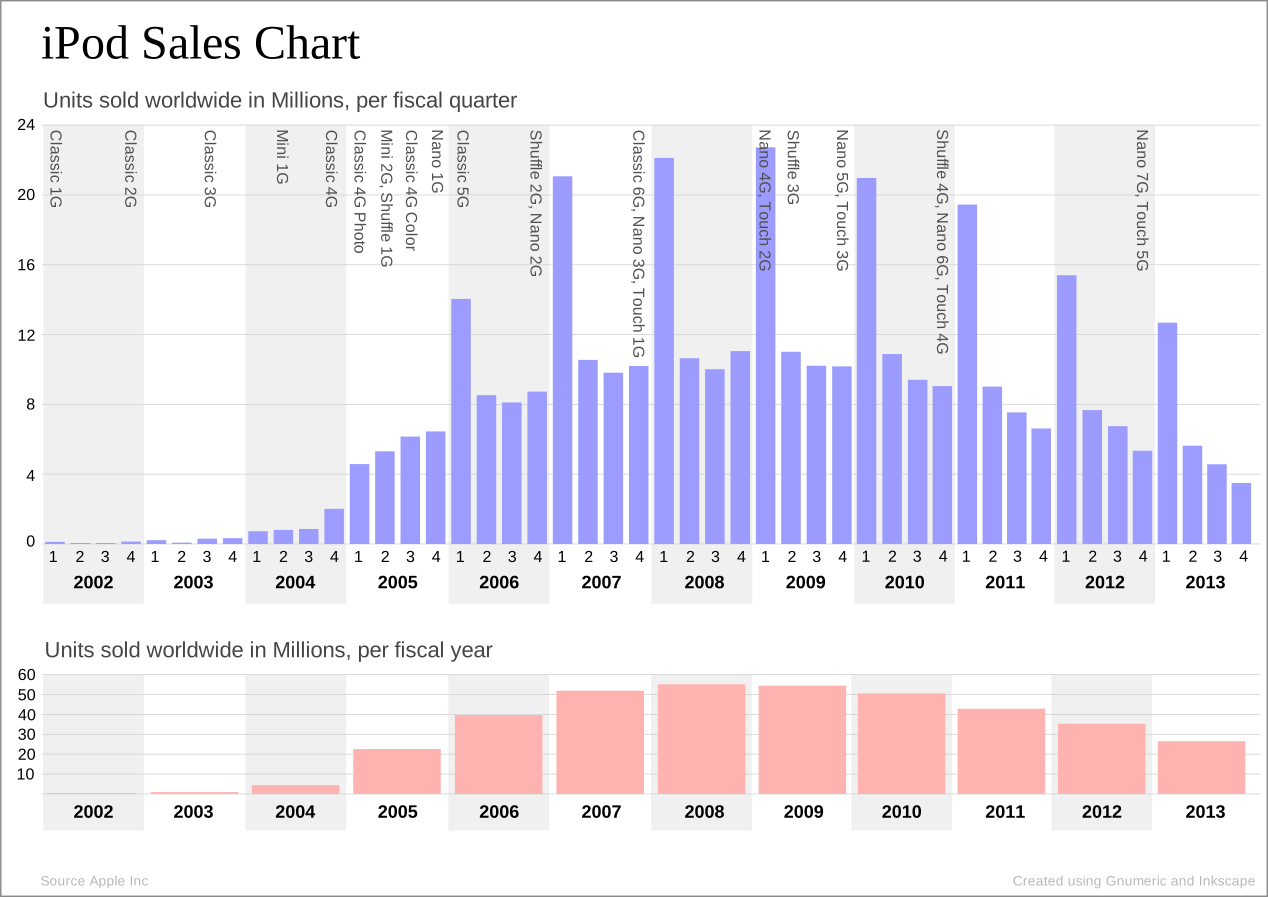
A few year back, at the height of the iPod boom, I predicted its swift demise.
I might have titled this said blog post something like Why the iPod must die!

So back then I was predicting the death of single purpose devices such as MP3 players in general and the iPod in particular. Well... I was wrong, but not all the way. The iPod is still around, but sales are declining. As a matter of fact they have been declining every year since my prediction was made in 2008:


Why do I want to warm up old toast you ask? Good question. Another thing I mentioned towards the end of the aforementioned blog post was about, how I believed, Apple could make boatloads of money, not with the iPod itself, but with the control over the connection mechanism, the 30-pin dock.

Most "i" devices Apple introduced up to iPhone 4S have this connection mechanism. A whole supporting universe of accessory makers has emerged that use that 30-pin standard to connect anything from stereo systems to zebra pattern 3d printers (I made this one up, don't Google needlessly!).
However, Apple, like Sun, when it missed the JVM for the trees, missed to monetize the 30-pin connector handsomely. While normally very astute in locking in consumers and partners alike, this was a big miss, indeed, for Apple. Also contributing to this was the ease with which people could reverse engineer the connector.

But fret no more, under the guise of improving user experience, Apple introduced the new "lightning connector" and closed this loophole with the iPhone 5. Though I have not heard any of my friends or co-workers ever state that they had trouble or needed a new way to connect, it is now a fact of live that we will have to buy many adapters or replace existing gadgets.

Now, the life of the 3rd party accessory maker has changed drastically as well. No longer can they use simple analog techniques to reverse engineer this. There is an encryption chip specific to the connector that needs to be dealt with. Why would you need an encryption chip in the docking connector? To control its use of course. IMHO this thing is so complicated that it delayed the launch of the promised lightning to Apple dock adapter.
Thus, for manufacturers the only viable alternative is to check with Apple to see what the terms of licensing lightning technology would be. This, in turn, translates into revenue in the future for Apple, and my prediction made many years ago, finally comes true !

Cheers,
B.

Tuesday, November 20, 2012

CF: ColdFusion with Amazon Load Balancer (ELB) and mysterious line breaks causing "unterminated string literal" exceptions

This seems like a complicated scenario at first until I started thinking about it again.
You use ColdFusion in the Cloud, specifically in the Amazon cloud, you then add a load balancer in front of your servers, then you notice your JavaScript starting to error out in some browsers. You cannot explain it.
Then, you spent countless hours going nuts.

Here is a sample JavaScript and ColdFusion block that would break. The simple block retrieved a name from a ColdFusion function and passed it to JavaScript:


<cfoutput>
  <script type="text/javascript">
    var myName = '#fCallForName()#';
  </script>
</cfoutput>


The above returned this in browser lets say the name was "John" :


  <script type="text/javascript">
    var myName = '
John';
  </script>


This, in turn, throws a "unterminated string literal" exception in JavaScript because of the line break right before the name. Of course, you say, silly you, you probably doing something in CF to return a Newline character combination. Good thought! So I changed the CF side to be as simple as possible. Here is the CF code that returns an empty string; guaranteed!


<cffunction name="fCallForName" returntype="string">
<cfreturn "">
</cffunction>


So nope, empty string still produced new line in the JavaScript output. So a few brain cycles go by and
I get to thinking to check to hit servers directly (bypassing amazon ELB altogether) and see what is returned. The return this time is enlightening, there is a blank string rather than the expected empty string, but no newline.


  <script type="text/javascript">
    var myName = ' ';
  </script>


Yeah, progress, maybe? This is different, which again it should not be. Thus, the only thing this establishes is that the Amazon load balancer (ELB) is changing the output stream somehow. Then, I also remembered an earlier blog post of mine where I outlined that CF inserts an empty space character when the function output is used directly in place in HTML context:  http://boncode.blogspot.com/2009/03/cf-coldfusion-functions-and-case-of.html
... and the fog began to lift.

I immediately reassigned the function output to a variable like so:

<cfset userName = fCallForName()>

Then, used the variable to output the content of the function:


<cfset userName = fCallForName()>
<cfoutput>
  <script type="text/javascript">
    var myName = '#userName#';
  </script>
</cfoutput>


...and bingo, everything started to work again. No more JavaScript errors. However the conclusions here are more scary then the error:

a) ColdFusion does introduce more than just a space character when function output is used in place
b) Amazon elastic load balancer makes modifications (corrections?) to the network stream and changes the output. For each in place output of function call it adds a line break.

Both a) and b) should not happen, but they do ;o(
At least now my pain could be your gain. Cloud pittfals, I guess...simple assumptions like surely the load balancer will not modify my data could throw you off .

Cheers,
B.


Thursday, October 18, 2012

CF: CFCamp 2012 more of everything

CFCamp 2012 is over. It was another whirlwind affair with more people, more speakers, more topics and more sponsors.
Overall a good gathering that had some nuggets to take away and think about.
Thanks everyone who stayed for my late presentation on practical application security.

You can download presentation slides if you want to review them at your leisure.

Cheers,
B.